
First setup
Desktop and Server have different first-run sign-in flows. Follow only the branch for the product you installed.
Before you begin
Keep an upstream credential out of this step: setup configures Stravia administration and its database, not a model service. For Server, start a fresh process with an operator-chosen data directory and keep its console available for the one-time setup token. For a managed deployment, decide whether to use SQLite in the data directory or an already provisioned PostgreSQL database.
Do not publish a first-run Server to an untrusted network. Use a loopback-only setup for local learning, or complete the deployment's management-origin, TLS, proxy, and network controls before exposing it.
Complete Desktop setup
- Start Stravia Desktop and open its integrated management interface.
- Continue under the native local session. Desktop does not use Server's one-time setup token or require a Server administrator password.
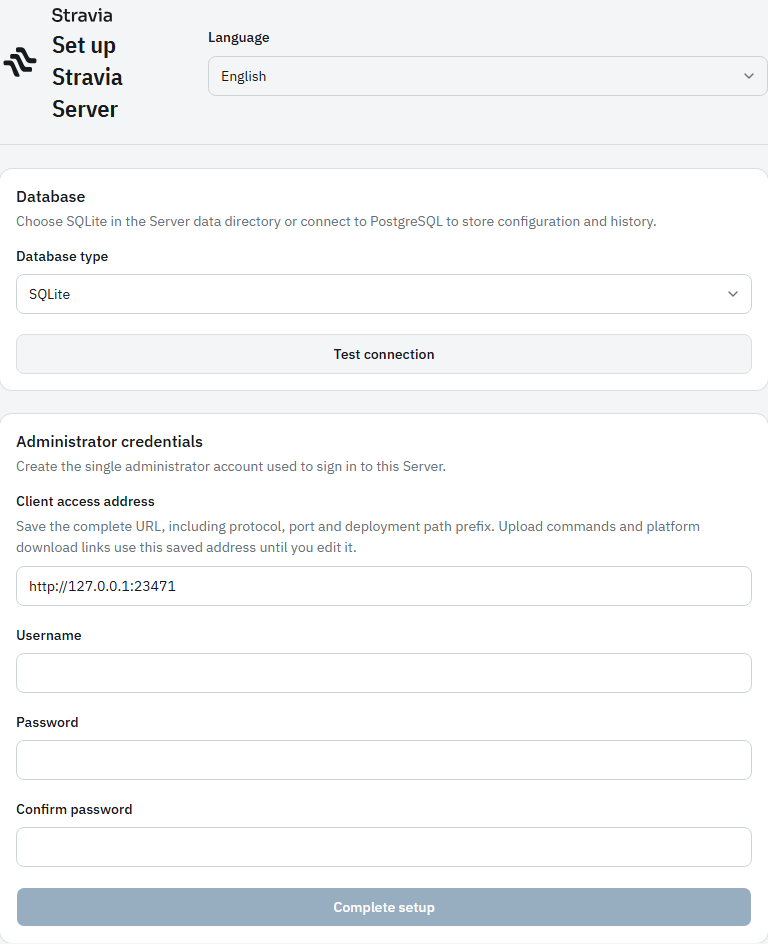
Complete Server setup
- Start the Server and open
/setupat the listener address. - Enter the one-time token printed in the current Server process console. It is consumed when accepted and is not an API key.
- Choose SQLite in the Server data directory or enter the PostgreSQL connection settings.
- Select Test connection. Continue only after the UI reports that the database connection succeeded.
- Enter the sole Server administrator credentials and complete setup. Sign in when the UI redirects to the login page.
The setup form requires a successful database test before completion. If the process is restarted before claiming the token, use the token from the new process; an old token is not a durable recovery credential.
Verify setup
For Desktop, confirm the integrated management UI opens under its native session. For Server, confirm that setup completed and the administrator can sign in. A healthy process or open setup page alone does not prove that a model service is configured.
Troubleshoot an incomplete setup
Check that the Server process is still running, that the token came from that process, and that the database test succeeded. For PostgreSQL, verify the URL, credentials, availability, and permissions. Do not delete an existing data directory or assume setup can replace an existing administrator.
Next steps
Connect an upstream service with Add a model service , then continue through Quick start .