
Create an API key
A Stravia API key authenticates inference requests from a client. It is separate from the upstream service credential and the Server administrator password.
Before you begin
Create and enable the model the client needs. Decide which Model IDs the client requires, whether the key should expire, and whether this client needs optional MCP or injection capabilities.
Create a narrowly scoped key
- Open API Keys and create a key.
- Turn Allow all models off.
- Open Select allowed models and keep only the Model ID this client needs. Remove other selected models before saving.
- Set an expiry or concurrency limit if needed. Treat Allow MCP clients and automatically exposed capabilities as separate opt-ins; do not enable them unless the client needs them.
- Save and copy the generated key when Stravia displays it. Store it securely; do not paste it into screenshots, logs, or public examples.
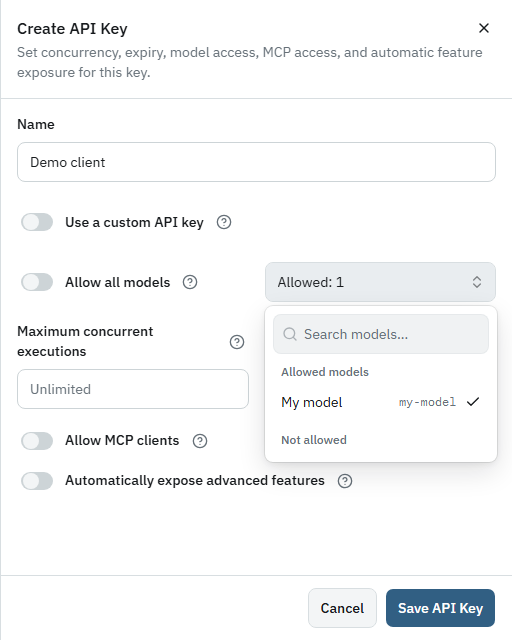
When Allow all models is turned off, the editor may initially select the currently available models. Review the selection and remove every model this client does not need before saving.
Verify its access
Use Connect clients to confirm the key is eligible for the intended enabled model. A client request using a model outside the key's allowed set should not be used as a successful connectivity test.
Troubleshoot an unavailable key
Check whether the key is enabled, expired, scoped to the exact Model ID, and eligible for the client setup page. If a key is disclosed, disable or replace it rather than assuming that deleting a local copy revokes it.
Next steps
Use the key in Connect clients or send a request using First request .