
Add a model service
Add a model service after initial setup. The service connection stores the upstream endpoint and authentication details Stravia uses when it routes a client request.
Before you begin
You need an account and a supported authentication method for the upstream service. The service may charge for requests. If the service is supplied by a separately installed Vendor plugin, first obtain and review that component from a trusted source.
Connect the service
- Open Model services and choose Connect service.
- Select the provider or compatible service and the sign-in method that matches your account.
- Enter the requested endpoint and upstream credential. Use the credential and base URL supplied for that service; do not enter a Stravia administrator password or client API key here.
- Save the connection and wait for its model inventory to synchronize.
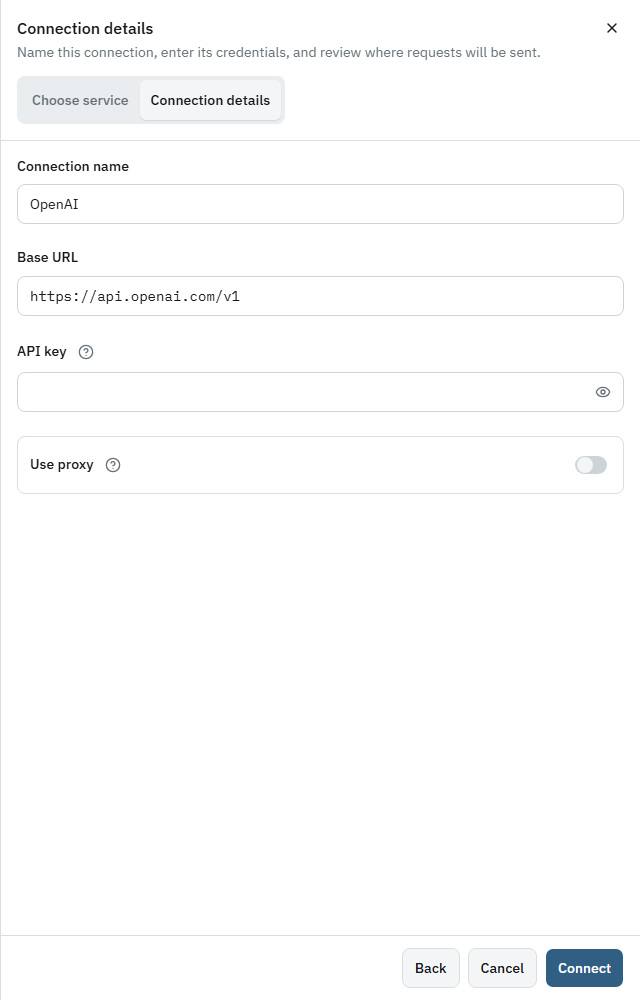
Provider forms differ: available login methods, endpoint fields, and discovered models depend on the selected Vendor and service. Do not copy one provider's fields into another provider's form.
Verify the connection
Confirm that the new service appears in Model services and that its model inventory has loaded. A saved connection with a failed authentication or synchronization result is not ready for routing.
Troubleshoot missing models
Check the endpoint, upstream account permissions, authentication method, and any required plugin. Then retry the service's model synchronization. If discovery is unavailable for the chosen service, use the product's supported manual model workflow rather than assuming the catalog is complete.
Next steps
Choose an upstream model and give it a client-facing ID in Add a model , or follow the full Quick start .