
Model services
A model service is Stravia's connection to an upstream provider or compatible model endpoint. Stravia uses that connection when an enabled model destination routes a client request.
Before you connect
Prepare the provider account and authentication method supported by its current Vendor. Check whether the service requires a base URL, tenant or project details, a separately installed Vendor plugin, or an account-level model entitlement. The provider form varies by service.
Steps to add and synchronize a service
- Open Model services and choose Connect service.
- Select the Vendor and an authentication method available for that service.
- Enter the endpoint and provider credential requested by the form.
- Save the service and wait for the model inventory to synchronize.
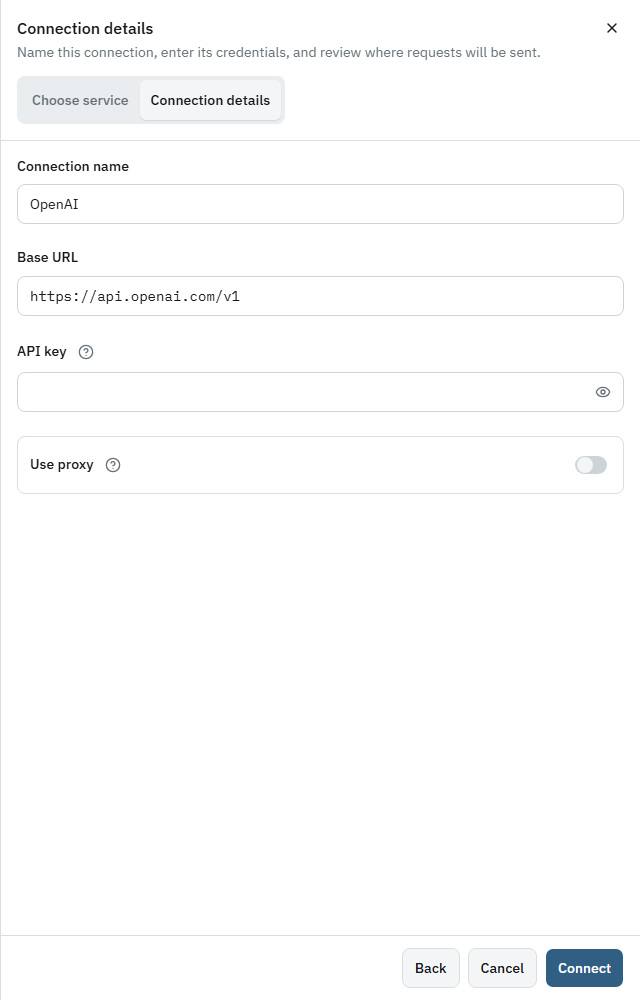
Do not put the Stravia API key or management password in provider fields. Those credentials serve different roles. Treat a provider key as a secret, and remember that requests routed through this service may incur provider charges.
Verify connection and model availability
Confirm the service is present and the model catalog has loaded. If synchronization is unavailable or a model is absent, check the service-specific fields and account permissions. A provider catalog is not a guarantee that every listed model is enabled or can be routed by Stravia.
Troubleshoot connection or synchronization issues
When a service cannot connect or its model list does not update, verify the selected authentication method, endpoint, provider account access, and any required Vendor plugin. Use only the fields shown for that service; API-compatible providers may still require different settings. After correcting a connection, re-check its catalog before creating or changing a client-facing Model ID.
Manage credentials and plugins carefully
Authentication options depend on the provider integration. A Vendor plugin is executable component code, not just a credential form; review its source and permissions before importing it. Do not assume that two providers with similar API formats accept the same endpoint or authentication scheme.
Next steps
Select an upstream model and configure its client-facing route in Models and routing , or use Add a model service in the first-use sequence.